

Have you ever tried to hang a picture or build something and wished you had a tool to check if it’s perfectly straight? If you own an iPhone, you might be wondering: does your phone have a level tool built-in?
Knowing this little trick can save you time, effort, and even a trip to the hardware store. Keep reading to discover how your iPhone can become your new handy helper for leveling tasks—and how easy it is to use this hidden feature every day.
Iphone Level Tool Basics
The iPhone has a built-in level tool that helps you measure flat surfaces. It is useful for tasks like hanging pictures or checking if a table is even.
This tool is easy to use and does not require any extra apps. You can find it right inside the iPhone’s native apps.
Where To Find The Level Tool
The level tool is part of the iPhone’s Measure app. You do not need to download it separately because it comes pre-installed.
To open the level, launch the Measure app and switch to the Level feature. It is easy to find and use without extra steps.
- Open the Measure app on your iPhone
- Tap the “Level” option at the bottom
- The screen will change to show the level tool
How The Level Tool Works
The iPhone level uses the phone’s built-in sensors to detect tilt. It shows you if a surface is flat or angled.
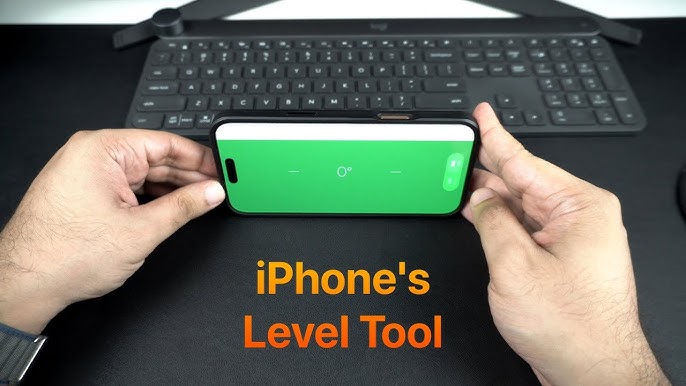
You place your iPhone on the surface or hold it against an object. The screen shows numbers and colors to tell you the angle.
- The green screen means the surface is level
- Numbers show how many degrees off level the surface is
- You can use the level in two modes: flat or edge

Credit: apps.apple.com
Using The Level Tool For Accuracy
The iPhone has a built-in level tool that helps you measure surfaces. It uses the phone’s sensors to check if something is straight or flat.
You can use this tool to make sure pictures hang straight or to check if shelves are level. It gives you quick and accurate readings.
Measuring Horizontal Surfaces
To measure a horizontal surface, place your iPhone flat on the surface. The level tool will show if the surface is even.
If the bubble or indicator is centered, the surface is level. If not, you can adjust the surface until it is straight.
- Open the Measure app on your iPhone.
- Tap on the Level tab at the bottom.
- Lay the iPhone flat on the surface.
- Watch the bubble to see if it is centered.
Checking Vertical Alignments
You can also use the level tool to check vertical surfaces. Hold your iPhone against the wall or object.
The tool will tell you if the surface is straight up and down. This helps with hanging pictures or fixing posts.
- Open the Measure app and select the Level tab.
- Hold your iPhone vertically against the surface.
- Check if the bubble stays in the center.
- Adjust the object until the reading is level.
Calibrating The Level Tool
For best results, you should calibrate the level tool. This keeps the tool accurate over time.
Calibration is simple. Place your iPhone on a flat surface and reset the level tool to zero.
- Find a perfectly flat surface, like a table.
- Open the Level tool in the Measure app.
- Place your iPhone on the surface and hold steady.
- Tap the screen to set the level to zero.
- This resets the tool for accurate readings.
Level Tool Features Across Ios Versions
The iPhone includes a level tool to help users measure flatness. This tool is part of the Measure app on iOS devices.
The level tool has changed a bit through different iOS versions. These changes improved usability and accuracy.
Evolution Of The Level Tool
At first, the level tool was a simple bubble level simulation. It helped users check if a surface was flat or tilted.
Later, Apple added features like a digital angle display and visual guides. This made it easier to get precise measurements.
- Early versions showed only a bubble level
- Added digital angle readouts in newer updates
- Visual guides help align objects better
- Some versions allow calibration for accuracy
Differences In Ios Updates
iOS 12 introduced the Measure app that included the level tool. It combined a bubble level and ruler in one app.
iOS 14 improved the level tool by adding a more responsive interface. It also showed angle degrees clearly.
| iOS Version | Level Tool Features |
|---|---|
| iOS 12 | Basic bubble level and ruler in Measure app |
| iOS 13 | Improved accuracy and smoother animations |
| iOS 14 | Clear angle display and faster response |
| iOS 15+ | More stable and integrated with other tools |

Credit: apps.apple.com
Third-party Level Apps For Iphone
The iPhone has a built-in level tool in the Measure app. Some users look for more advanced options. Third-party level apps offer extra features and precision.
These apps can enhance your leveling tasks. They provide more accuracy and additional tools for various needs.
Popular Alternatives
There are several popular third-party level apps available for iPhone users. These apps offer unique features and enhanced accuracy.
- iHandy Level: Known for its simple interface and precision.
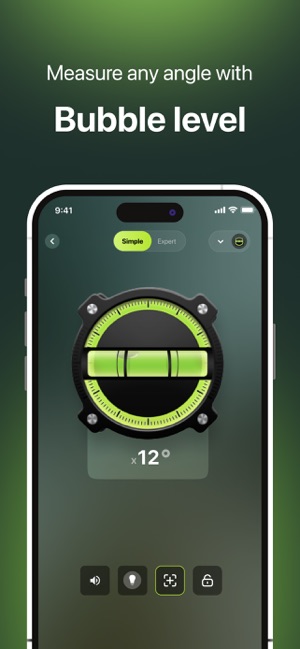
- Bubble Level for iPhone: Offers a bubble view for easy leveling.
- Clinometer: Provides angle measurements and a visual guide.
Benefits Over The Built-in Tool
Third-party level apps have advantages over the built-in iPhone tool. They offer more accuracy and additional functionalities.
These apps can cater to specific leveling needs, making them more versatile for various tasks.
- Enhanced precision for professional tasks.
- Additional views and modes for different leveling scenarios.
- Customizable settings to suit user preferences.
Practical Uses For The Iphone Level
The iPhone has a built-in level tool inside the Measure app. This tool helps you check if surfaces are flat or straight. It works like a small bubble level you use in real life.
You can use the iPhone level for many tasks around the house, during photography, and for crafting projects. It is easy to use and always with you.
Home Improvement Projects
The iPhone level helps you hang pictures, shelves, and frames straight. It also works for checking if furniture or appliances are even. This tool saves time and ensures your home looks neat.
You can also use it for small repair jobs, like fixing doors or windows. The level helps you see if they close properly without gaps.
- Hang pictures and frames evenly
- Level shelves and furniture
- Check doors and windows alignment
- Ensure appliances sit flat
Photography And Videography
The iPhone level helps photographers and videographers keep their shots straight. It prevents tilted horizons and crooked backgrounds. This improves the quality of photos and videos.
Using the level tool is helpful when setting up a tripod or placing the camera on uneven surfaces. It keeps your shots balanced and professional-looking.
- Keep horizons straight in photos
- Balance camera on tripods
- Align video shots on uneven ground
- Improve framing and composition
Diy And Crafting
The iPhone level helps when building small projects or crafting. It ensures your work is balanced and well-made. This is useful for woodworking, model building, and art displays.
You can check the level of tables, picture frames, or shelves you make. This tool helps avoid mistakes and makes your projects look better.
- Check woodwork for even cuts
- Balance art and craft displays
- Ensure shelves and tables are level
- Improve accuracy in DIY projects
Tips For Getting Precise Measurements
Many people wonder if the iPhone has a level tool. It does. The iPhone includes a built-in level inside the Measure app. You can use it to check if surfaces are flat or straight.
Using the iPhone level tool correctly helps get exact results. Small mistakes can cause wrong readings. This guide shares tips to avoid errors and keep the sensor accurate.
Avoiding Common Mistakes
One common mistake is not holding the iPhone steady. Movement can change the reading. Place the phone flat and keep it still while measuring.
Another error is not calibrating the level tool before use. Make sure the iPhone is on a flat surface to reset the level. This step improves accuracy.
- Hold the phone steady without shaking
- Calibrate on a known flat surface
- Use the correct side of the phone for measuring
- Avoid measuring on soft or uneven surfaces
Maintaining Sensor Accuracy
The iPhone uses sensors like the accelerometer and gyroscope for the level tool. These sensors need care to stay accurate. Avoid dropping or exposing the phone to strong magnets.
Keep your iPhone updated. Apple often improves sensor performance through software updates. Check for updates regularly to keep the level tool working well.
- Handle your iPhone gently to protect sensors
- Keep the phone away from magnets or strong magnetic fields
- Update iOS to the latest version regularly
- Restart the phone if the level tool acts strangely
Credit: apps.apple.com
Frequently Asked Questions
Does Iphone Have A Built-in Level Tool?
Yes, iPhones include a built-in level tool within the Measure app. It helps users check surface flatness easily and accurately.
How Do I Access The Level Tool On Iphone?
Open the Measure app and swipe left to find the Level tool. It activates the iPhone’s accelerometer for precise leveling.
Is The Iphone Level Tool Accurate For Professional Use?
The iPhone level tool is quite accurate for everyday tasks but may not replace professional-grade tools for precise measurements.
Can The Iphone Level Tool Measure Angles?
Yes, the iPhone level tool can measure angles and slopes, making it useful for various DIY and construction projects.
Conclusion
The iPhone does have a level tool built in. You can find it inside the Measure app. This tool helps you check if surfaces are flat or straight. It works well for small tasks around the house. No need to buy a separate level device.
The tool is easy to use and always with you. So, the iPhone offers a simple, handy way to measure levels anytime.