


If you’ve ever wanted to take your woodworking skills to the next level, mastering the router tool is a game-changer. But maybe you’re wondering, how do you use a router tool safely and effectively?
This powerful device can shape edges, carve patterns, and create smooth finishes, but only if you know the right steps. You’ll discover simple, clear instructions that will boost your confidence and help you get professional results every time. Ready to unlock your router’s full potential?
Let’s dive in.

Credit: www.findbuytool.com
Choosing The Right Router
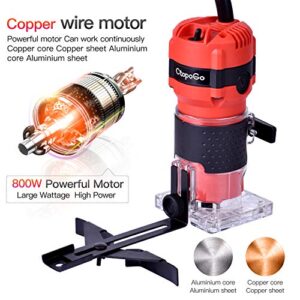
A router is a tool that shapes wood edges and cuts designs. Picking the right router helps you do your work well.
There are many routers made for different jobs. Knowing what to look for saves time and effort.
Types Of Routers
Routers come in several types. Each type fits different projects and skill levels.
- Fixed Base Router: Good for straight cuts and easy to control.
- Plunge Router: Can start cutting inside the wood surface.
- Combo Router: Switch between fixed and plunge bases.
- Trim Router: Small and light, used for trimming edges.
Selecting Router Bits
Router bits cut the wood in different shapes. Choose bits that match your project needs.
- Straight Bits: Cut straight grooves and dados.
- Round-Over Bits: Smooth and round the wood edges.
- Chamfer Bits: Cut angled edges for decoration.
- Flush Trim Bits: Trim edges to match templates.
- V-Groove Bits: Create V-shaped cuts or patterns.
Router Features To Consider
Look for features that make the router easy and safe to use. These help you get better results.
- Power: Higher power cuts harder wood easily.
- Speed Control: Adjust speed for different materials.
- Ergonomic Handles: Comfortable grip reduces fatigue.
- Depth Adjustment: Set cutting depth quickly and accurately.
- Dust Collection: Keeps work area clean and clear.
Setting Up Your Router
Using a router tool requires careful setup to work safely and well. This guide covers the main steps to prepare your router.
Follow these tips to install bits, adjust settings, and stay safe while routing wood or other materials.
Installing Router Bits
Router bits shape the material you work on. Installing them correctly is important for good results and safety.
- Unplug the router before changing bits.
- Use a wrench to loosen the collet nut.
- Insert the router bit fully into the collet.
- Leave about ¼ inch of the bit exposed.
- Tighten the collet nut securely.
- Check that the bit spins freely without wobbling.
Adjusting Depth And Speed
Set the depth and speed to match your project and material. These affect the cut quality and tool control.
| Setting | Purpose | How to Adjust |
| Depth | Controls how deep the bit cuts | Turn the depth adjustment ring or use the depth stop |
| Speed | Changes the rotation speed of the bit | Use the speed dial or switch on the router |
Safety Precautions
Safety is key when using a router. Follow these rules to avoid injuries and damage to your work.
- Always wear safety glasses and ear protection.
- Keep your hands clear of the bit while running.
- Use clamps to hold your workpiece securely.
- Make sure the router is unplugged before changing bits or adjusting settings.
- Check for loose clothing or jewelry that could get caught.
- Work in a clean, well-lit area.
Basic Router Techniques
A router is a powerful tool for shaping wood edges and cutting grooves. Learning basic techniques helps you work safely and accurately. This guide covers how to guide the router, control its speed, and use common cutting patterns.
Proper handling and steady movements create clean cuts. Each technique builds your skill and confidence with the router tool.
Guiding The Router
Hold the router firmly with both hands for control. Use a guide or fence to keep the tool straight. Move the router smoothly along the workpiece to avoid uneven cuts.
- Choose the right base plate for your cut type
- Clamp a straight edge as a guide
- Keep the router flat against the surface
- Move the router against the bit rotation
- Maintain a steady speed and pressure
Controlling Feed Rate
Feed rate means how fast you push the router through the wood. Too fast causes rough cuts and tool damage. Too slow can burn the wood or overheat the bit.
| Feed Rate | Effect | Tip |
|---|---|---|
| Too Fast | Rough edges, bit wear | Slow down for cleaner cuts |
| Too Slow | Burn marks, bit overheating | Increase speed slightly |
| Just Right | Clean, smooth cuts | Maintain steady, moderate pace |
Common Cutting Patterns
Routers cut many patterns. Knowing common cuts helps with different projects. Use the right bit and guide for each pattern.
- Edge Profiling:Shapes edges for decoration or safety
- Grooving:Cuts channels for joints or designs
- Rabbeting:Creates steps on edges for fitting pieces together
- Template Routing:Follows a pattern to copy shapes
Credit: arvutikoda.ee
Advanced Cutting Methods
Using a router tool lets you make precise and complex cuts in wood. Advanced cutting methods help you create smooth edges, joints, and decorative patterns. These techniques improve the look and strength of your projects.
Below are some key methods to use your router effectively. Each method requires different tools and setups. Learning these will expand what you can build with a router.
Using Templates And Jigs
Templates and jigs guide the router to cut exact shapes and repeat designs. Templates are patterns attached to the workpiece. Jigs hold the wood steady for accurate cuts. They reduce errors and save time.
- Attach the template securely to avoid movement.
- Use a router bit with a bearing to follow the template edge.
- Make shallow passes to control the cut depth.
- Check the jig alignment before routing.
- Test cuts on scrap wood to verify settings.
Edge Profiling
Edge profiling shapes the sides of wood pieces for decoration or function. Different router bits create styles like roundovers, chamfers, or ogees. Edge profiles add a finished look and can protect edges from damage.
| Profile Type | Use | Router Bit Shape |
| Roundover | Soft, rounded edges | Curved bearing bit |
| Chamfer | Beveled edges at an angle | 45-degree angled bit |
| Ogee | Decorative S-shaped edges | Complex curved bit |
Dado And Groove Cuts
Dado and groove cuts create slots in wood. Dados run across the grain, while grooves run with the grain. These cuts join pieces together strongly, often for shelves or panels.
Follow these tips for clean dado and groove cuts:
- Choose the correct bit width for the slot size.
- Set the cutting depth carefully for a tight fit.
- Use a fence or guide to keep cuts straight.
- Make multiple shallow passes to avoid splintering.
- Test on scrap wood before the final cut.
Maintenance And Troubleshooting
Using a router tool properly requires regular maintenance. Keeping it clean and sharp helps it work well. Troubleshooting common problems can save time and money.
This guide shows how to clean the router, replace bits, and fix issues. Follow simple tips to keep your tool in good shape.
Cleaning The Router
Dust and debris can build up on the router. Clean it after each use to avoid damage. Use a dry brush or compressed air to remove dirt.
Wipe the router body with a soft cloth. Avoid using water or harsh chemicals. Keep vents clear to prevent overheating.
Replacing Bits
Router bits wear out or break over time. Replace bits to keep cuts clean and accurate. Use the right size for your router model.
Turn off and unplug the router before changing bits. Use the correct wrench to loosen and tighten the collet. Store bits in a safe place.
- Turn off and unplug the router
- Use wrench to loosen collet
- Remove old bit carefully
- Insert new bit fully
- Tighten collet securely
Fixing Common Issues
If the router does not start, check the power source and switch. Make sure the cord is not damaged. Replace if needed.
For uneven cuts, check bit sharpness and depth settings. Tighten loose parts and clean the base plate. If vibration occurs, inspect bearings.
- Check power and switch
- Inspect and replace damaged cords
- Sharpen or replace dull bits
- Adjust cutting depth
- Tighten loose parts
- Clean base plate
- Check bearings for wear

Credit: www.youtube.com
Frequently Asked Questions
What Is The Primary Use Of A Router Tool?
A router tool is used to hollow out or shape wood edges. It helps create decorative edges, grooves, and joints in woodworking projects. This tool increases precision and efficiency for both beginners and professionals.
How Do You Choose The Right Router Bit?
Select a router bit based on the cut type and wood material. Consider bit size, shape, and quality for smooth, accurate results. Using the correct bit ensures clean cuts and extends the tool’s lifespan.
What Safety Precautions Should I Follow Using A Router?
Always wear safety goggles and hearing protection while operating a router. Secure the wood firmly and keep hands away from the bit. Follow manufacturer guidelines to prevent accidents and ensure safe usage.
How Do You Control A Router Tool Effectively?
Maintain a steady grip and move the router slowly along the wood. Use both hands to stabilize the tool and apply consistent pressure. This technique results in smooth, precise cuts without burning the wood.
Conclusion
Using a router tool can make woodworking easier and more precise. Practice helps you handle it with confidence. Always follow safety rules to avoid accidents. Start with simple projects to build your skills. A router adds smooth edges and designs to wood.
Keep your tool clean and well-maintained for best results. Enjoy creating pieces that look neat and professional. With patience, your work will improve over time. Give it a try and see the difference yourself.