

Are you ready to take your crafting to the next level by cutting wood with your Cricut? You might be wondering which Cricut tool can handle this tough material without damaging your machine or your project.
Choosing the right tool is key to making clean, precise cuts in wood and bringing your creative ideas to life. You’ll discover exactly which Cricut tool cuts wood effortlessly, plus tips to get the best results every time. Keep reading—your next amazing wood project is just a few clicks away!
Credit: www.craft-e-corner.com
Cricut Tools For Wood Cutting
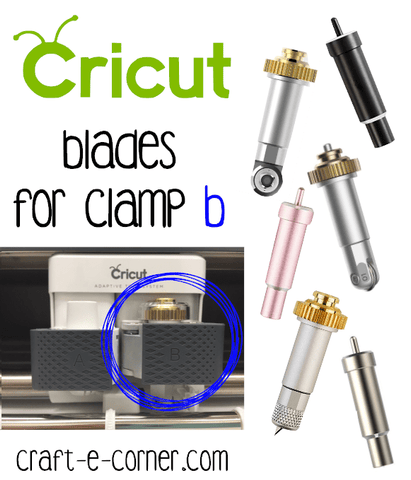
Cricut machines offer several tools that can cut wood materials. Choosing the right blade depends on the wood type and thickness. Using the correct tool helps you get clean and precise cuts.
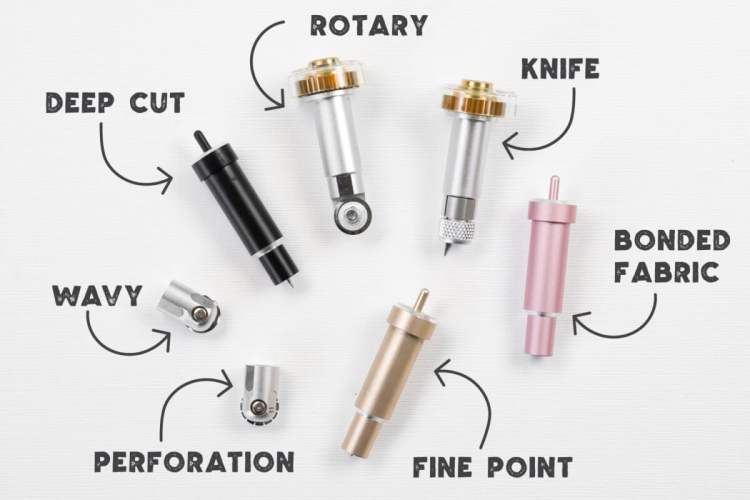
This guide covers the Cricut Maker Knife Blade, the limits of the Rotary Blade, and when to use the Fine Point Blade for wood projects.
Cricut Maker Knife Blade
The Cricut Maker Knife Blade is designed to cut thicker and denser materials like wood. It works well on balsa wood, basswood, and other thin wood sheets. This blade is strong and precise for detailed cuts.
- Cuts wood up to 2.4 mm thick
- Ideal for basswood and balsa wood
- Requires the Maker machine for use
- Provides smooth and accurate cuts
Rotary Blade Limitations
The Rotary Blade is not meant for cutting wood. It is best for fabric, paper, and thin materials. Using it on wood can damage the blade and machine.
| Tool | Material Suitability | Thickness Limit |
|---|---|---|
| Rotary Blade | Fabric, paper, thin materials | Up to 2 mm |
| Knife Blade | Wood, leather, thick materials | Up to 2.4 mm |
Fine Point Blade Use Cases
The Fine Point Blade cuts thin wood sheets but only very light and soft types. It is better for paper and vinyl but can work on very thin balsa wood.
- Best for paper, vinyl, and cardstock
- Can cut very thin balsa wood sheets
- Not suitable for dense or thick wood
- Works with most Cricut machines
Types Of Wood Compatible With Cricut
Cricut machines can cut a variety of wood types. Knowing which wood works best helps you create smooth, detailed projects. Not all wood is safe or easy to cut with Cricut tools.
This guide covers basswood sheets, balsa wood options, and plywood considerations for Cricut cutting. Each type has unique features to keep in mind.
Basswood Sheets
Basswood is a popular choice for Cricut cutting. It is soft, light, and cuts cleanly without splintering. Basswood sheets come in thin layers, perfect for detailed designs.
- Easy to cut with Cricut knife blade
- Lightweight and smooth surface
- Good for engraving and scoring
- Available in various thicknesses
Balsa Wood Options
Balsa wood is the lightest wood Cricut can cut. It is softer than basswood, which makes it ideal for beginners. Balsa wood cuts quickly but may chip if not handled carefully.
| Balsa Wood Thickness | Best Use | Cricut Tool |
|---|---|---|
| 1/16 inch | Small crafts, models | Knife blade |
| 1/8 inch | Layered projects | Knife blade |
| 3/16 inch | Thicker crafts, signs | Knife blade (multiple passes) |
Plywood Considerations
Plywood is harder to cut than basswood or balsa. Thin plywood sheets can work with Cricut, but thick layers may damage the blade. Choose soft plywood types for best results.
- Use thin plywood under 1/8 inch thick
- Look for smooth, soft plywood varieties
- Use the knife blade with slow, multiple passes
- Avoid plywood with heavy glue or rough surfaces
Preparing Wood For Cricut Cutting
Cutting wood with a Cricut machine takes careful preparation. You need to set up the wood and the machine correctly. This helps you get clean cuts and avoid damage.
Before cutting, make sure the wood is thin and smooth. Thick or rough wood can break your blade or machine.
Choosing The Right Mat
Pick a strong mat that holds wood tightly. A strong grip stops the wood from moving during cutting. Use a Cricut StrongGrip mat for best results.
Make sure the mat is clean and sticky. If it loses stickiness, clean it with a damp cloth or replace it.
- Use StrongGrip mat for wood cutting
- Check mat stickiness before use
- Clean or replace mats that are old
Securing Wood On The Mat
Place the wood flat on the mat. Press it down firmly to stick well. Use painter’s tape on edges for extra hold.
Make sure the wood does not cover the mat edges. This keeps the mat feeding smoothly into the machine.
- Place wood flat and press firmly
- Use painter’s tape on edges
- Keep edges of mat clear
Adjusting Machine Settings
Set your Cricut machine to cut wood. Choose the right blade, like the Deep-Point blade. Set the material type to basswood or veneer.
Use multiple passes if needed. Lower the cutting speed for better control and cleaner cuts.
- Use Deep-Point blade for wood
- Select basswood or veneer material setting
- Lower speed for clean cuts
- Use multiple passes if needed
Step-by-step Wood Cutting Process
Cutting wood with a Cricut tool is simple. Follow these steps to create perfect wood cuts.
Ensure you have the right materials and settings. This will help you achieve the best results with your Cricut tool.
Designing Your Project
Start by designing your project in the Cricut Design Space. Choose a simple design for best results.
Make sure your design matches the size of your wood piece. Adjust the dimensions as needed.
Loading The Wood
Place the wood on a strong grip mat. Ensure it sticks well to prevent movement during cutting.
Load the mat into the Cricut machine. Use the machine’s guides to align it properly.
Monitoring The Cut
Watch the machine as it cuts the wood. Ensure the blade is cutting smoothly and not getting stuck.
Pause the machine if you notice any problems. This prevents damage to your wood piece.
Tips For Clean And Precise Cuts
Using a Cricut machine to cut wood requires precision. Follow these tips for the best results. Ensure your tools are in excellent condition and understand the right techniques.
Attention to detail is key. Proper maintenance and technique will help achieve smooth edges.
Blade Maintenance
Keeping your blade sharp is crucial. A dull blade can ruin your project. Regularly check the blade for any wear.
Replace the blade when it gets dull. A sharp blade ensures cleaner cuts.
- Inspect the blade before each use
- Clean the blade after cutting
- Store the blade safely
Cutting Multiple Passes
For thicker wood, cut in multiple passes. This reduces strain on the blade and machine.
Adjust settings for multiple passes. Start with a lighter pressure and increase gradually.
| Material | Passes | Pressure |
| Balsa wood | 2-3 | Medium |
| Thin plywood | 3-4 | High |
Avoiding Wood Splintering
Wood can splinter during cutting. Use masking tape on the cut line to minimize splintering.
Ensure the wood is flat and stable. Secure it properly to prevent movement.
- Use a new blade for less splintering
- Cut slowly and steadily
- Support the wood from underneath

Credit: www.youtube.com
Common Issues And Troubleshooting
Using a Cricut tool to cut wood can be tricky for beginners. Some problems may appear during your projects. Knowing common issues helps to fix them fast.
This guide covers blade dulling, mat adhesion problems, and machine error messages. Follow these tips to keep your cutting smooth and accurate.
Blade Dulling
The blade wears out after many cuts on hard materials like wood. A dull blade can cause rough edges and poor cuts. Replace or sharpen the blade regularly to keep good results.
- Check the blade for chips or bent tips.
- Use the right blade type designed for wood cutting.
- Clean the blade to remove stuck debris.
- Replace the blade if cuts become uneven or slow.
Mat Adhesion Problems
Wood pieces need to stick firmly to the cutting mat. Poor adhesion causes slipping and miscuts. Always clean and prepare the mat before use.
| Problem | Cause | Solution |
|---|---|---|
| Wood moves during cutting | Mat is dirty or not sticky enough | Clean the mat with a damp cloth or use a new mat |
| Wood does not stick well | Mat is old or worn out | Replace the mat to improve grip |
| Wood lifts after cut | Cut settings too deep | Adjust cut pressure to avoid lifting |
Machine Error Messages
Cricut machines may show errors during wood cutting. These messages help identify what needs fixing. Read each message carefully to solve the problem.
- Blade error:Check if the blade is installed correctly.
- Mat error:Make sure the mat is loaded straight and clean.
- Material error:Confirm you selected the right material setting for wood.
- Pressure error:Lower the cut pressure or check for jams.
Creative Projects Using Wood Cuts
Wood is a great material for creative projects. It offers warmth and a natural look to any craft. Using the right Cricut tool helps you cut wood precisely and safely.
Many crafters enjoy making custom items from wood. These projects can be both fun and useful around the home or as gifts.
Custom Signs
Cricut tools cut thin wood sheets to create personalized signs. These signs add character to homes or events. You can design names, quotes, or logos with ease.
- Choose basswood or balsa wood sheets for cutting
- Use the Cricut Maker with the knife blade for clean cuts
- Apply paint or stain after cutting for better look
- Seal the wood for durability
Jewelry And Accessories
Wood pieces can be shaped into unique jewelry and accessories. Lightweight wood is best for earrings, bracelets, and pendants. The Cricut Maker tool cuts these small parts precisely.
| Type | Wood Type | Recommended Tool |
| Earrings | Basswood | Cricut Maker with Knife Blade |
| Bracelets | Balsa Wood | Cricut Maker with Knife Blade |
| Pendants | Cherry Wood Veneer | Cricut Maker with Knife Blade |
Home Decor Pieces
Wood cuts can create many home decor items. These include coasters, wall art, and decorative boxes. Using the Cricut Maker tool gives smooth edges and detailed shapes.
- Pick thin wood sheets under 2.4 mm thickness.
- Use masking tape to hold wood steady while cutting.
- Start with simple shapes before trying detailed designs.
- Sand edges lightly after cutting for a clean finish.

Credit: www.craft-e-corner.com
Frequently Asked Questions
What Cricut Tool Is Best For Cutting Wood?
The Cricut Maker with the Knife Blade is best for cutting wood. It handles thin wood sheets accurately and safely, making it ideal for intricate designs.
Can Cricut Cut Thick Wood Pieces?
Cricut Maker can cut wood up to 2. 4 mm thick. Thicker wood may damage the blade or machine, so always check thickness before cutting.
How Do I Prepare Wood For Cricut Cutting?
Use thin, smooth wood sheets like basswood or balsa wood. Secure wood firmly on the cutting mat and select the correct material setting for clean cuts.
Is The Cricut Knife Blade Reusable For Wood?
Yes, the Knife Blade is reusable but has limited lifespan. Replace it after several uses to maintain clean, precise cuts on wood materials.
Conclusion
Cricut tools can cut wood thin enough for crafts and projects. The Cricut Maker with a knife blade works best for wood sheets. Always choose the right wood type and thickness for clean cuts. Safety matters—work slowly and carefully to avoid mistakes.
This tool helps create unique designs easily at home. Try simple projects first to get comfortable with cutting wood. Enjoy making personalized items with your Cricut and wood materials.